
Buying line, stages 1 to 3
The buying line: listing link in, Awaiting Purchase out
When CNCartGo buys on your behalf, the work before the warehouse is yours: the right listing, the right option, and a first checkout you understand.
What CNCartGo does when it buys for you
On this line CNCartGo acts on your behalf with the Chinese seller. You send the listing, the option and the quantity; staff place the order, pay the seller in yuan, and have the goods delivered to the Guangzhou warehouse. You never need a Chinese bank card, a Chinese phone number or a Chinese address, which is the whole reason the service exists.
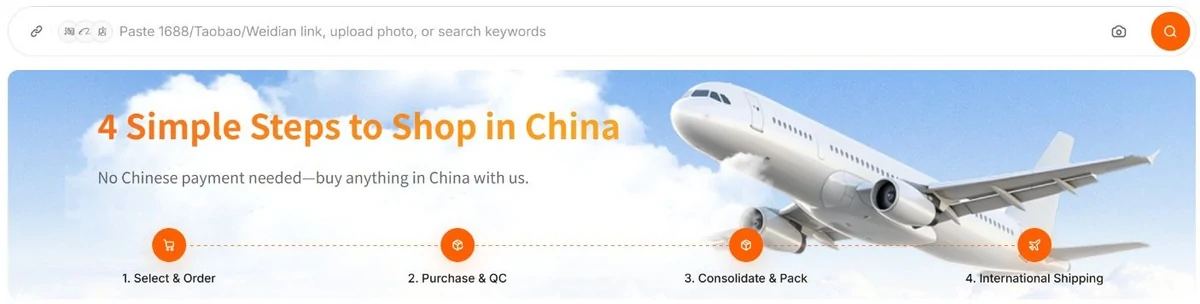
The search bar on cncartgo.com takes three kinds of input: a pasted link, an uploaded photo, or keywords. Links work for Taobao, 1688, Tmall, JD and Weidian according to the How to Buy page; the advantages page adds Pinduoduo, and the mobile homepage shows a Xianyu icon too. If the search cannot read a listing, the account area has a DIY order type for manual requests. CNCartGo's own banner sums the route in four steps: select and order, purchase and QC, consolidate and pack, international shipping.
Menus, shops and minimum orders on the buying line
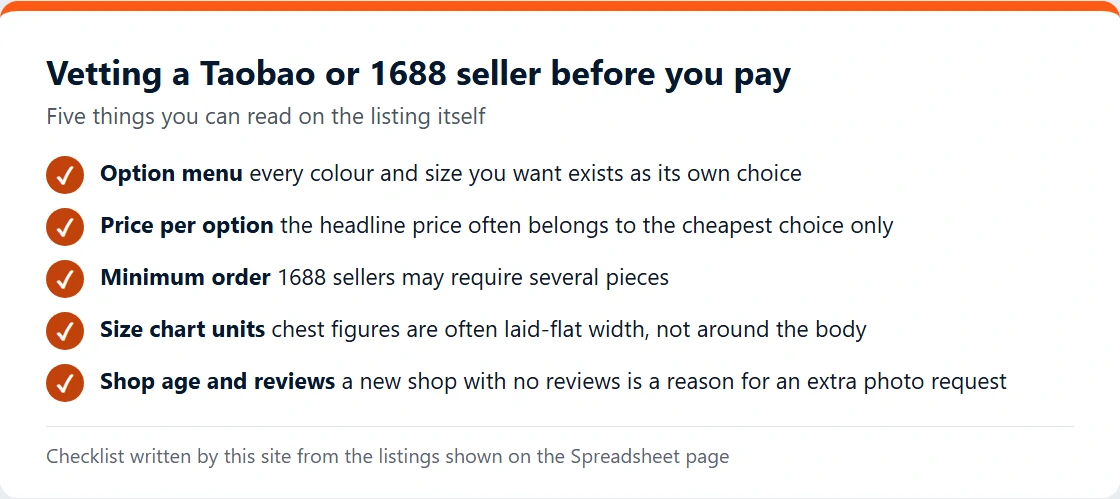
Most buying-line problems are settled before the link is pasted. Chinese listings bundle many products under one headline price, and the cheapest option is usually the one shown in search. Read the option menu one choice at a time and check that the colour, size and model you want each exist as a separate choice with its own price. On the Spreadsheet page we note where a listing's menu holds a surprise, such as trousers sold by length rather than waist, or a power bank whose variants differ in cable count.
Choosing a seller is the other half. To vet a seller, look at shop age, review count and whether the size chart is in centimetres around the body or laid flat. On 1688 check the minimum order: a wholesale seller may refuse a single piece, and CNCartGo cannot change that. When in doubt, CNCartGo's guide asks you to describe exactly what you need next to the link and to ask before paying; staff can confirm details with the seller.
Checkout one on the buying line, itemised
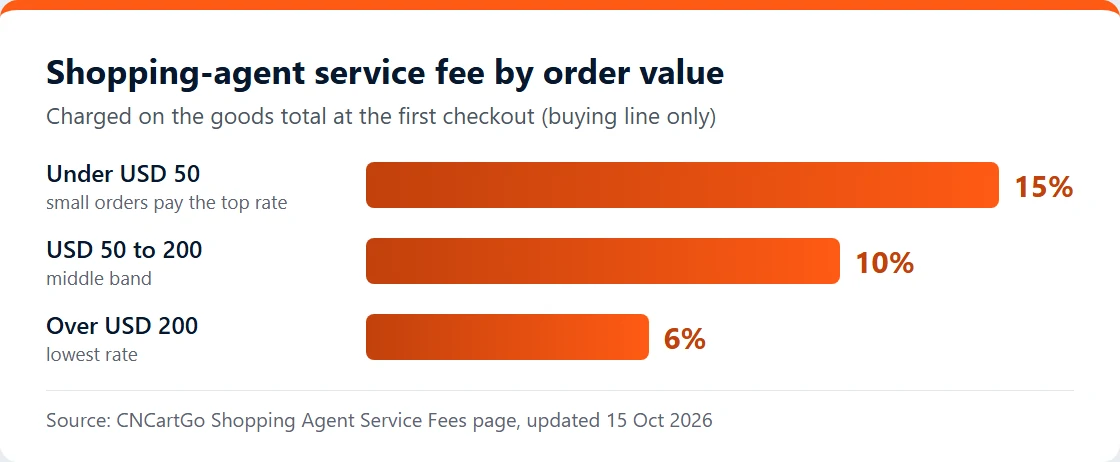
The first payment has three parts: the product price, the seller's delivery to the warehouse, and CNCartGo's service fee. The fee is tiered on the value of the goods: 15 per cent under USD 50, 10 per cent from USD 50 to 200, 6 per cent above USD 200. It is shown at checkout and, per CNCartGo, covers buying, basic inspection on arrival, storage handling and support.
| Goods total | Tier | Fee | First checkout |
|---|---|---|---|
| USD 40.00 | 15% | USD 6.00 | USD 46.00 + China delivery |
| USD 120.00 | 10% | USD 12.00 | USD 132.00 + China delivery |
| USD 260.00 | 6% | USD 15.60 | USD 275.60 + China delivery |
Two edges of the tiers deserve attention. A USD 48 cart pays more in fees than a USD 52 one (USD 7.20 against USD 5.20), so a small extra item can lower the total. And the fee is refunded in full only if you cancel before the purchase happens; once goods are bought or in stock it stays with CNCartGo, even if you later return the item.
Between payment and arrival
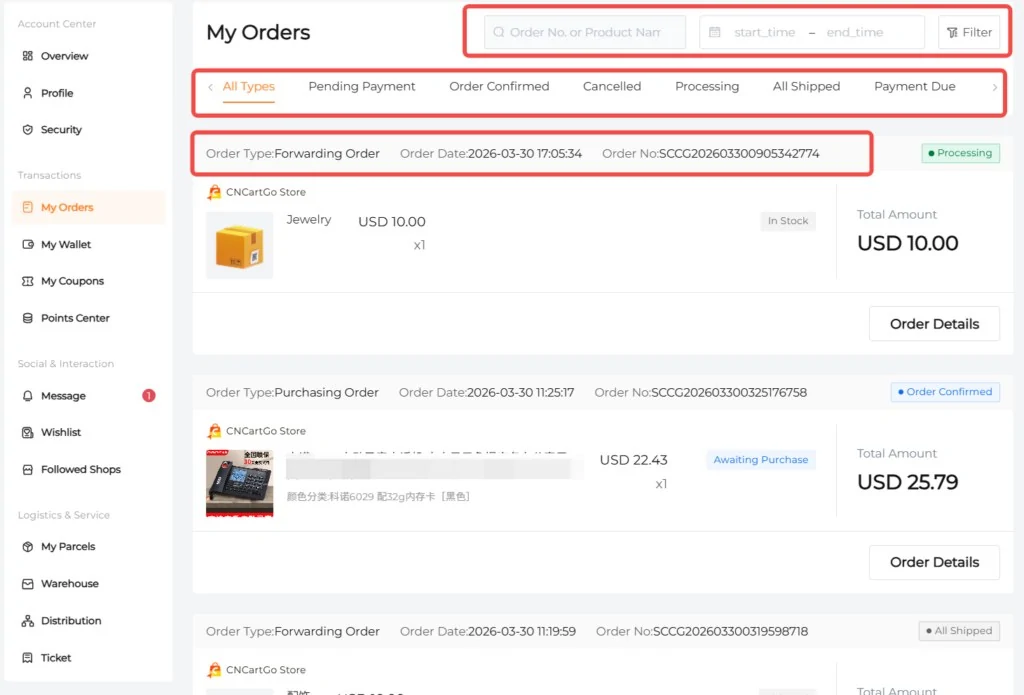
After checkout the order sits in My Orders. CNCartGo's screenshots show a purchasing order marked Order Confirmed with the item line reading Awaiting Purchase, and a forwarding order marked Processing with the item In Stock. You can still cancel or edit until the order reaches Processing; after that the seller has been paid and cancellation is off the table.
Seller stock and options can change between your click and the purchase. If an option has sold out, support contacts you rather than substituting. Domestic delivery time depends on the seller, and the tracking appears on the order once the seller ships. If a carrier shows the parcel delivered but the warehouse has not logged it, CNCartGo asks for the order reference and domestic tracking number so staff can search the dock.
Next stop: the warehouse, where both lines meet.